
AUDIO AND ANTENNA - Radio Anti-Theft System
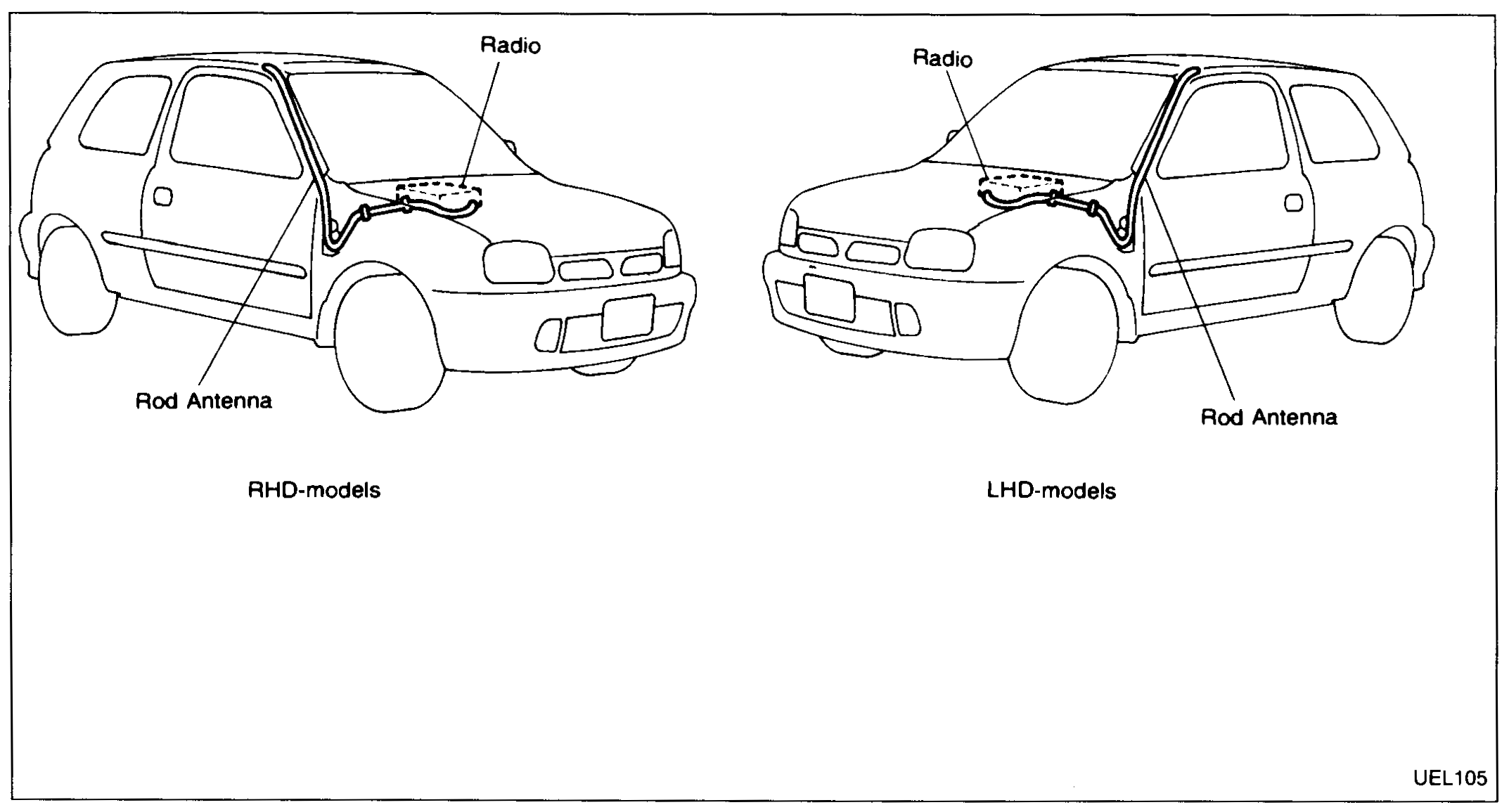
EL-121component photoComponent-location diagram distinguishes RHD-models (rod antenna front right) from LHD-models (rod antenna front left).
Component LocationFig. fig1
Audio component locations: radio in centre dash and rod antenna at the front fender; RHD-models antenna on right side, LHD-models antenna on left side.
UEL105
1Radio(Centre dash)
2Rod Antenna(Front fender (right for RHD, left for LHD))
Radio
ANTI-THEFT SYSTEM
By using a personal 4-digit code known only to the vehicle owner, the possibility of the audio unit being stolen is effectively reduced, because without the code the unit can not be activated. When in normal use, the unit is unlocked and accessible in the usual way.
If however, someone attempts to remove the unit or the ground cable is disconnected from the battery, the Anti-theft system activates and the unit "locks". The only way it can be unlocked is by entering a personal code number known only by the owner.
With the ignition switch off, a flashing LED indicates that the anti-theft system is activated.
For details of setting up the radio activation and tuning, refer to the audio unit manufacturer's operation booklet and the owner's manual.