
DTC P0335 CRANKSHAFT POSITION SENSOR (POS) - Component Inspection
EF & EC-7180prose procedureCG10, CGA3
Component Inspection
CRANKSHAFT POSITION SENSOR (POS)
Crankshaft Position Sensor (POS) Inspection
- 1Disconnect crankshaft position sensor (POS) harness connector.
- 2Loosen the fixing bolt of the sensor.
- 3Remove the sensor.
- 4Visually check the sensor for chipping.
- 5Reconnect crankshaft position sensor (POS) harness connector. If NG, replace crankshaft position sensor.
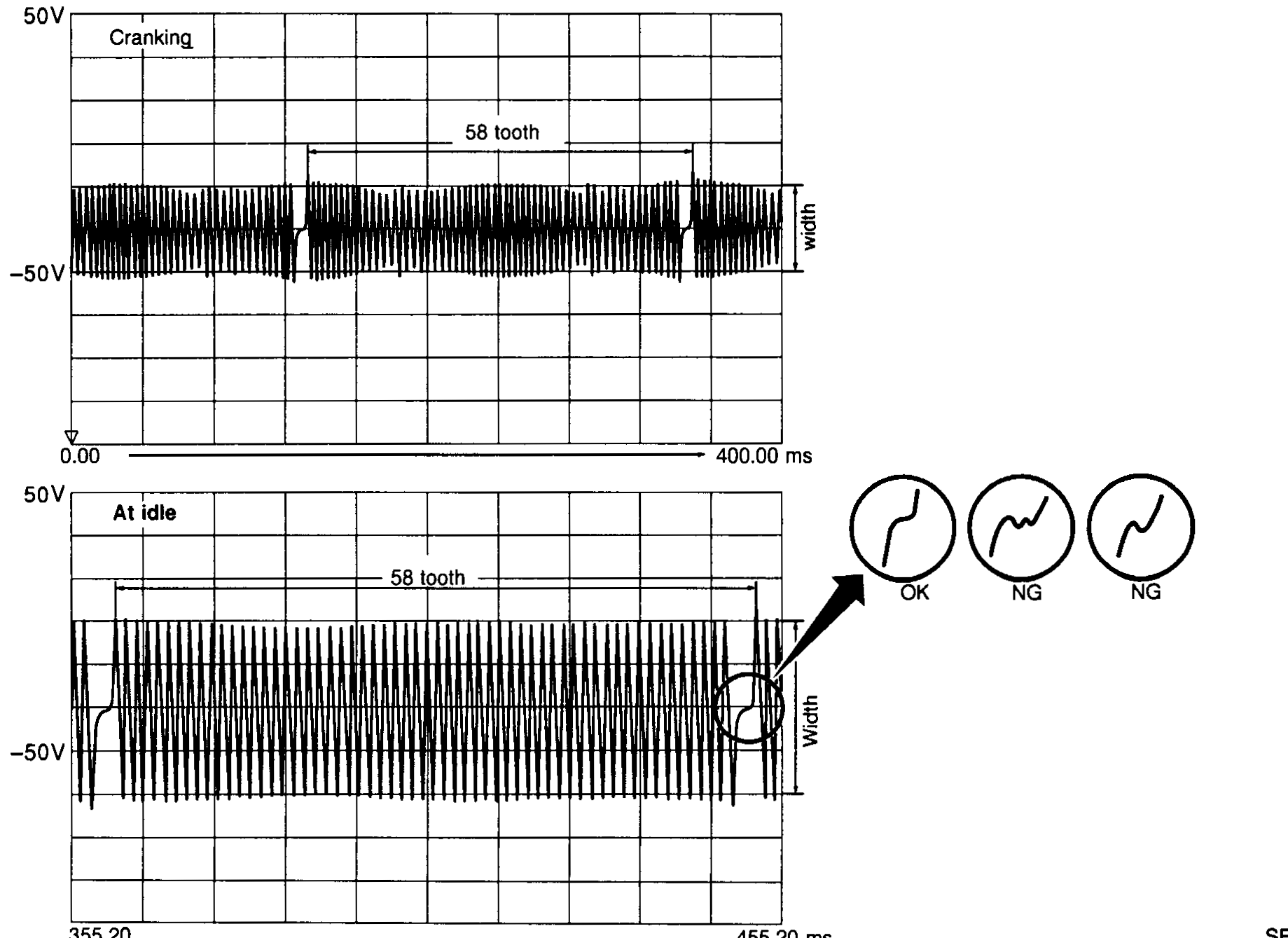
- 6Check wave form of CKPS(POS) using oscilloscope cranking and at idle as follow. a. Check number of teeth. 50 tooth. b. Each teeth has width sufficiently both when cranking and at idle speed as shown in the figure.
 SEF692Z