
PARKING BRAKE CONTROL — Exploded view / Removal and Installation
BR-31parts diagramDisc-brake and drum-brake variants share the front lever and routing but differ at the wheel-end cable termination — disc uses a lock plate, drum hooks onto the operating lever inside the backplate.
Removal and Installation
- 1To remove parking brake cable, first remove center console.
 UBR064
 - 2Disconnect warning lamp connector.
- 3Remove bolts, slacken off and remove adjusting nut.
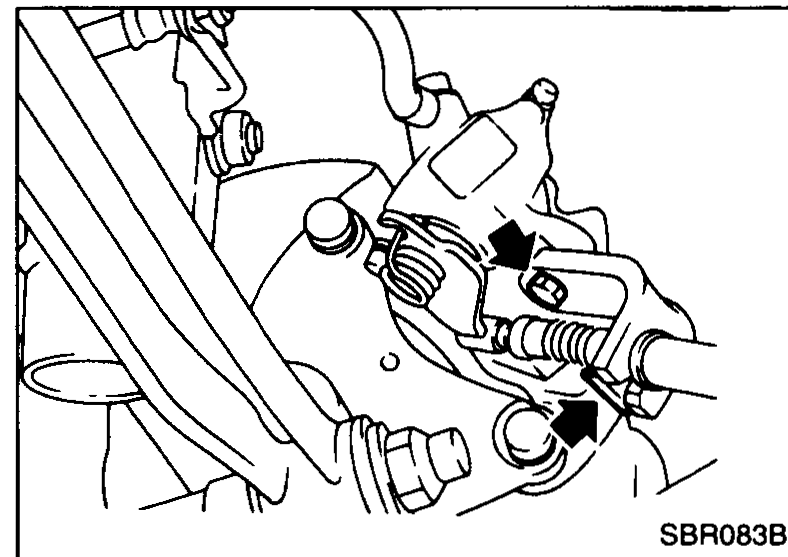
- 4Remove cable mounting bracket and lock plate (disc brake only). For drum brake models, refer to "Removal" in "REAR DRUM BRAKE".
 SBR083B
| Specification | Value |
|---|---|
| Hand-brake-lever-to-floor mounting bolt | 7.8 - 11N·m (0.8 - 1.1 kg·m, 6 - 8 ft·lb) |
| Rear-cable bracket bolt (forward) | 3.8 - 4.5N·m (0.39 - 0.46 kg·m, 2.8 - 3.3 ft·lb) |
| Rear-cable bracket bolt (rear) | 3.2 - 4.3N·m (0.33 - 0.44 kg·m, 2.4 - 3.2 ft·lb) |
| Disc-brake cable lock-plate bolt | 4.3 - 6.5N·m (0.44 - 0.66 kg·m, 3.2 - 4.8 ft·lb) |
Hand-brake-lever-to-floor mounting bolt
7.8 - 11N·m (0.8 - 1.1 kg·m, 6 - 8 ft·lb)
Rear-cable bracket bolt (forward)
3.8 - 4.5N·m (0.39 - 0.46 kg·m, 2.8 - 3.3 ft·lb)
Rear-cable bracket bolt (rear)
3.2 - 4.3N·m (0.33 - 0.44 kg·m, 2.4 - 3.2 ft·lb)
Disc-brake cable lock-plate bolt
4.3 - 6.5N·m (0.44 - 0.66 kg·m, 3.2 - 4.8 ft·lb)
See also
REAR DRUM BRAKE Removal